Installation
Clone, install dependencies, and run the seven-phase data setup so Rhema is ready for development.
Prebuilt installer (Windows)
If you just want to run Rhema and don't need to change it,
download the latest Windows installer.
It's rebuilt from main on every merge, and it needs no toolchain — no Bun, no
Rust, no Python.
What the installer leaves out
The Bible database, embedding model, and Whisper model are not bundled — together they run to well over a gigabyte. Without them the app starts, but verse detection and local speech-to-text stay inactive. Build from source below to get the full pipeline.
The installer is also unsigned, so Windows SmartScreen warns the first time you run it (More info → Run anyway).
There's no prebuilt macOS or Linux binary yet — build from source on those platforms.
Build from source
Once your toolchain is in place — see Prerequisites — you can clone the repo and run a single setup command.
Windows users
Run bun run setup:windows before setup:all and restart your terminal.
The Windows bootstrap installs LLVM and CMake via winget and persists
LIBCLANG_PATH for bindgen. See Platform setup.
Quick setup
Clone the repository
git clone https://github.com/openbezal/rhema.git
cd rhema
Install JavaScript dependencies
bun installThis pulls in the React frontend, the build orchestrator, and the data-prep scripts.
Run the unified setup pipeline
bun run setup:allsetup:all is idempotent — re-running it skips phases whose
output artifacts already exist, so it's safe to invoke after
git pull or when something changed in data/. Pass --force to
re-run every phase. The orchestrator (data/prepare-embeddings.ts)
runs seven phases in this exact order:
- Python environment — creates
.venvand installs the pip dependencies (optimum-onnx[onnxruntime],sentence-transformers,accelerate,tokenizers,numpy,torch,meaningless). - Bible source data — downloads a single bundled archive that contains all ten translations (KJV, NIV, ESV, NASB, NKJV, NLT, AMP, SpaRV, FreJND, PorBLivre) plus the cross-reference dataset from openbible.info.
- SQLite database — assembles
data/rhema.dbwith FTS5 virtual tables and cross-reference tables. - ONNX model — downloads
Qwen3/Qwen3-Embedding-0.6B, exports it viaoptimum-cli export onnx, and quantizes to INT8 for ARM64 withoptimum-cli onnxruntime quantize. - Verse export — emits the KJV verses to JSON for the embedding step.
- Embedding precomputation — runs the embeddings (auto-selects GPU via PyTorch if available; falls back to ONNX Runtime on CPU).
- Whisper model — downloads
ggml-large-v3-turbo-q8_0.binintomodels/whisper/so the local STT engine works without an internet round-trip.
Run in development
bun run tauri devThe Tauri shell opens with hot-reload for the React frontend at port 3000 and live-reloads the Rust backend on file changes.
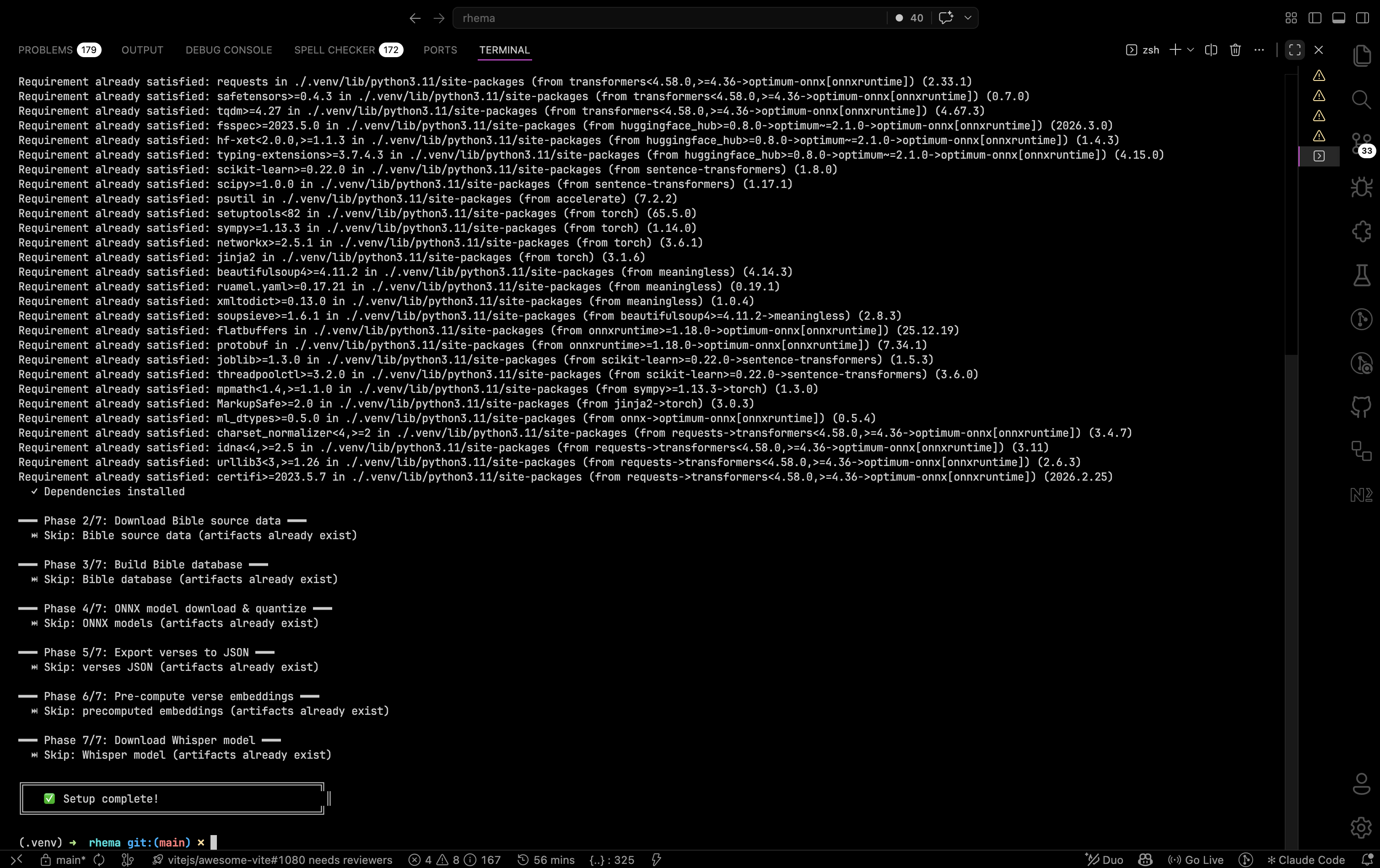
Terminal output during bun run setup:all — each of the seven phases prints its own progress block, and ⏭ Skip lines appear when an artifact is already present from a previous run. Click to expand.
Build for production
When you're ready to ship a native installer:
bun run tauri buildThe output lands in src-tauri/target/release/bundle/ — .dmg on macOS,
.msi and .exe on Windows, .AppImage and .deb on Linux.
NDI SDK (optional)
The NDI SDK isn't bundled because of NDI's redistribution policy. If you want broadcast output, fetch it once:
bun run download:ndi-sdkThis drops the platform-specific NDI 6 headers and shared libraries under
sdk/ndi/, where the rhema-broadcast crate finds them via dynamic
loading.
Running individual phases
Sometimes you want to re-run a single phase without nuking the whole pipeline. Each phase has its own script:
bun run download:bible-data        # Bundled translations + cross-refs
bun run build:bible                # Build SQLite database
bun run download:model             # Download & export ONNX model
bun run export:verses              # Export verses to JSON
bun run precompute:embeddings      # Rust ONNX binary (recommended)
bun run precompute:embeddings-onnx # Python ONNX Runtime path
bun run precompute:embeddings-py   # Python sentence-transformers (GPU)
bun run download:whisper           # Whisper model (ggml turbo q8_0)
python3 data/precompute-embeddings.py # GPU sentence-transformers
python3 data/precompute-embeddings-onnx.py # CPU ONNX Runtime fallbackSee the scripts reference for the full list and when to reach for each one.