NDI Broadcast Output
Send Rhema's verse overlays into your live production switcher as a first-class NDI source — configurable resolution, frame rate, and alpha mode.
Rhema doesn't replace your live production tooling — it plugs into it. The broadcast pipeline emits verse overlays as a standard NDI source, the same way a camera or a graphics machine would, so any NDI-aware switcher can consume it.
How it's wired
The rhema-broadcast Rust crate dynamically loads the
NDI 6 SDK at runtime via libloading
(libloading = "0.8" in crates/broadcast/Cargo.toml). We load the
SDK dynamically (rather than linking it) for two reasons:
- Licensing — NDI's redistribution terms don't allow shipping the SDK alongside arbitrary apps. Loading it from the user's install keeps Rhema clean of NDI binaries.
- Optionality — the app runs without NDI; the broadcast surface just doesn't appear on the network.
Setup
After the main setup:all, run the optional NDI download step:
bun run download:ndi-sdkThis places platform-specific NDI 6 headers and shared libraries under
sdk/ndi/. On macOS that's libndi.dylib, on Windows Processing.NDI.Lib.x64.dll,
on Linux libndi.so. The crate finds them automatically.
Discoverable as a source
Once a sender is running, any tool on the network can pick it up. Common consumers:
- vMix — Add → NDI / Desktop Capture → your Rhema source name.
- OBS with the obs-ndi plugin — Sources → NDI Source.
- Resolume, TriCaster, Wirecast, Tessera — all NDI-native.
The source name is part of the start request (source_name: String on
NdiStartRequest) so you can configure it from Settings → Broadcast,
and multi-room churches can run an instance per stage with stable
names.
Frame format
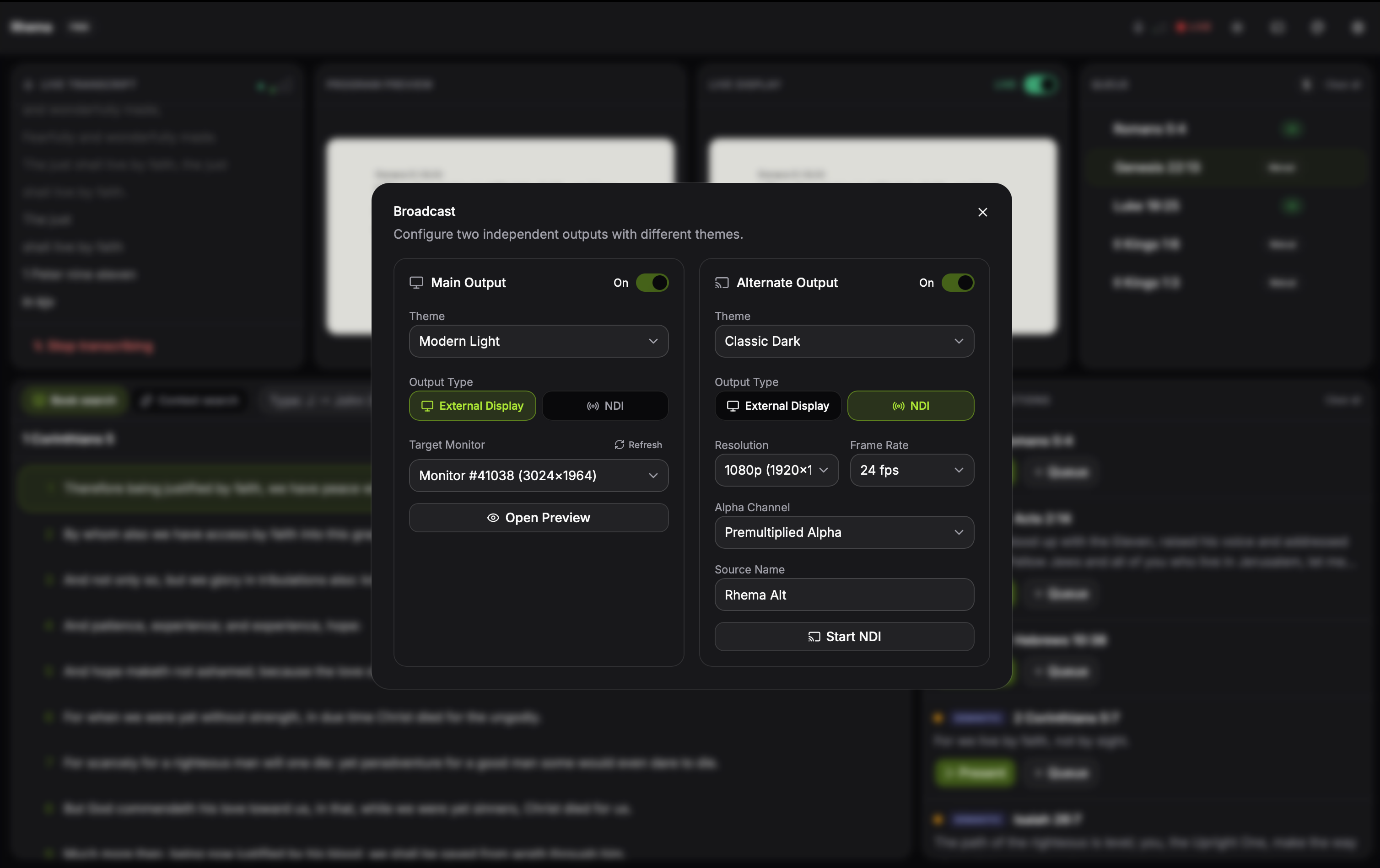
Settings → Broadcast exposes the source name, output resolution, frame rate (24/30/60), and alpha mode (none, straight, premultiplied). Changes apply on the next session start. Click to expand.
Rhema's NDI sender (crates/broadcast/src/ndi.rs) emits BGRA frames
with configurable resolution, frame rate, and alpha mode:
- Color space: BGRA —
fourccis set tob"BGRA"on every frame. - Resolution: configurable; the active theme canvas size is sent
through to the sender (broadcast settings expose
widthandheightknobs). - Frame rate: 24, 30, or 60 fps progressive (
enum NdiFpswith variantsFps24,Fps30,Fps60). The default is 30 fps. - Alpha mode: three options on
enum NdiAlphaMode—NoneOpaque,StraightAlpha,PremultipliedAlpha. Pick whichever matches your downstream switcher's expectation. - Audio: not transmitted — Rhema is a graphics source only.
Picking an alpha mode
Use StraightAlpha when your switcher composites with straight
alpha (vMix and most modern switchers). Use PremultipliedAlpha
when the downstream tool expects pre-blended color channels.
NoneOpaque ignores transparency entirely and is the right choice
when you want a solid backdrop with no key.
Latency profile
The end-to-end latency from "pastor speaks the verse" to "overlay on screen" comes from three contributors:
- STT processing (Whisper is roughly 50–400 ms depending on model and hardware; Deepgram streams within the WebSocket).
- Detection pipeline (the brute-force cosine scan over ~31k vectors completes in milliseconds on a modern CPU).
- NDI hop and downstream switcher buffering.
These numbers come from the dependencies, not from a Rhema benchmark suite — the project doesn't publish a measured latency budget yet. For most live services this lands at "one beat behind the speaker", which is the standard live-graphics convention.