Remote Control
Drive Rhema from Stream Deck, TouchOSC, or any HTTP client via OSC and a REST API.
Live operators rarely have a free hand on a keyboard. Rhema exposes its controls over OSC and an HTTP API so you can wire them into hardware controllers, automation scripts, and stage-management software. Both protocols can run simultaneously and share the same command set.
In-depth guide
This page is a high-level overview. The full protocol reference, authentication notes, and example payloads live in the remote control guide in the repository.
Protocols at a glance
| Protocol | Default port | Transport | Best for |
|---|---|---|---|
| OSC | 8000 | UDP | Stream Deck (via Companion), TouchOSC, QLab, hardware |
| HTTP | 8080 | TCP | REST clients, dashboards, scripting, status polling |
Both bind 0.0.0.0 so a phone, a staff laptop, or a hardware controller on
the LAN can reach them. That bind is not configurable yet, and there is no
authentication — while a server is running, anything on your network can drive
it, including send_to_live. Enable the servers only while you're using them,
and firewall the ports to the devices that need them. A loopback-by-default
option with an explicit opt-in is the next change scheduled here.
What you can do remotely
| Action | OSC address | HTTP body (POST /api/v1/command) |
|---|---|---|
| Next verse in queue | /rhema/next | { "command": "next" } |
| Previous verse in queue | /rhema/prev | { "command": "prev" } |
| Next verse in the Bible panel | /rhema/bible_next | { "command": "bible_next" } |
| Previous verse in the Bible panel | /rhema/bible_prev | { "command": "bible_prev" } |
| Send the preview to Live | /rhema/send_to_live | { "command": "send_to_live" } |
| Add the previewed verse to the queue | /rhema/add_to_queue | { "command": "add_to_queue" } |
| Show / hide overlay | /rhema/show, /rhema/hide | { "command": "show" } |
| Switch theme | /rhema/theme "Classic Dark" | { "command": "theme", "value": "Classic Dark" } |
| Set opacity | /rhema/opacity 0.75 | { "command": "opacity", "value": 0.75 } |
| Set confidence threshold | /rhema/confidence 0.8 | { "command": "confidence", "value": 0.8 } |
| Toggle on-air | /rhema/on_air true | { "command": "on_air", "value": true } |
All twelve commands work identically across both protocols, so any controller you already own (or build) talks the same dialect.
bible_next and bible_prev move the Bible Text panel, not the queue —
that's how you read straight through a passage the AI hasn't picked up yet.
The verse you land on goes to preview; send_to_live pushes it out.
Opacity is a stub today
The opacity command is wired through the dispatcher but currently a
placeholder — it'll take effect when the broadcast store gains opacity
support. The other eleven commands are fully live.
OSC
OSC runs on UDP port 8000. Configure the listening port in
Settings → Remote, and send messages from your favorite controller:
-
TouchOSC templates with verse-show/hide pads, opacity sliders, and theme buttons drop right onto a tablet.
-
Stream Deck + Bitfocus Companion's Generic OSC module maps each pad to one of the addresses above.
-
A simple test from the command line:
oscsend localhost 8000 /rhema/next
The Settings panel shows a live command log with timestamps so you can debug controller setups without leaving the app.
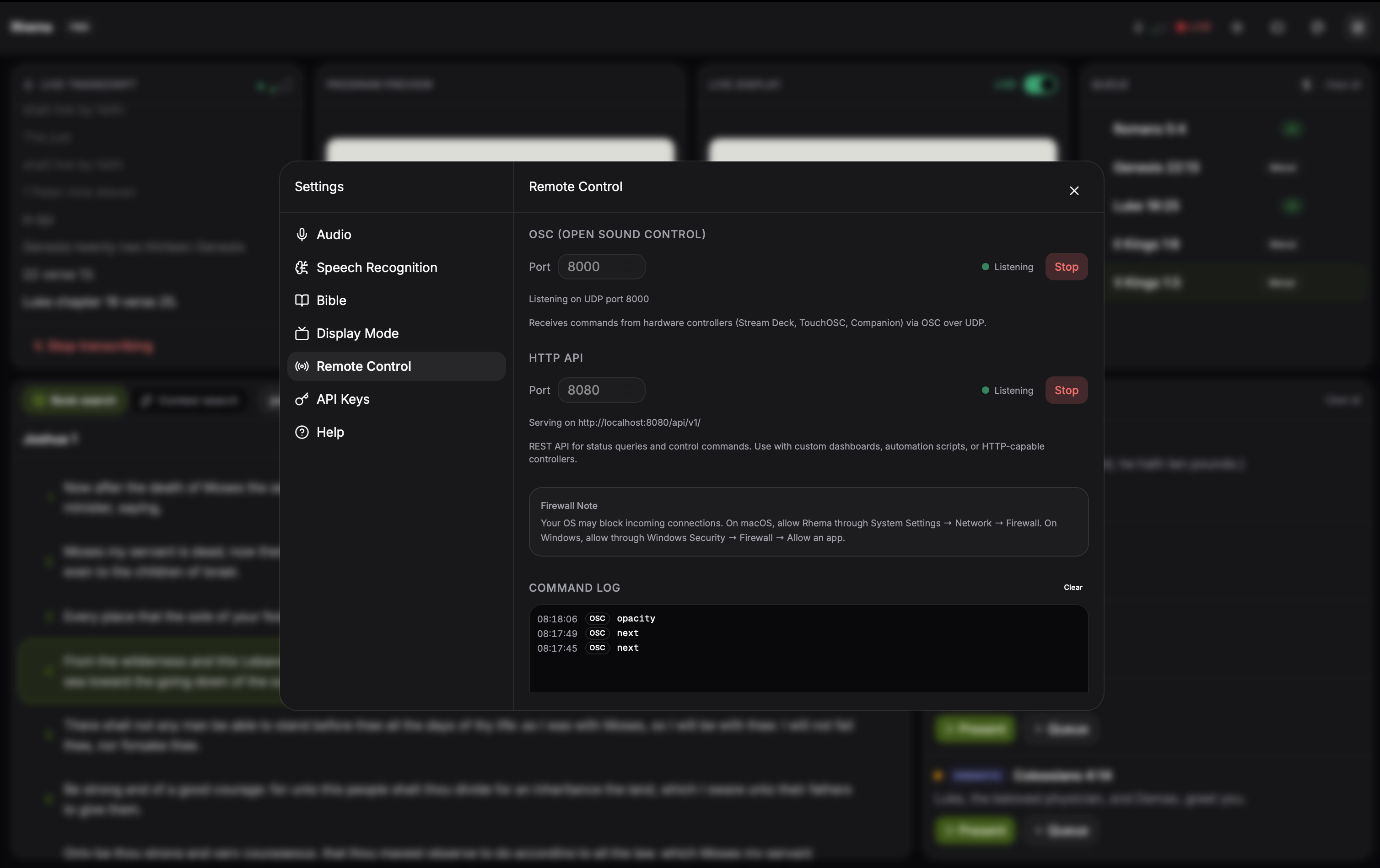
Settings → Remote: OSC and HTTP listeners with their port and host fields, connection status indicators, and a live command log that shows incoming OSC/HTTP traffic with timestamps. Click to expand.
HTTP API
For scripts and web automations, the HTTP API exposes the same
controls under /api/v1/:
| Endpoint | Method | Purpose |
|---|---|---|
/api/v1/health | GET | Liveness check — returns service name and version |
/api/v1/status | GET | Current state snapshot — on-air, active theme, live verse, queue length, confidence threshold |
/api/v1/command | POST | Dispatch a command (table above) |
curl -X POST http://localhost:8080/api/v1/command \
  -H 'Content-Type: application/json' \
  -d '{"command":"theme","value":"Classic Dark"}'
POST /api/v1/control is still accepted as an alias for the same handler, so
integrations written against older builds keep working. Use /api/v1/command
for anything new.
The status endpoint returns an authoritative view from a Rust-side state cache that the frontend refreshes once a second:
curl http://localhost:8080/api/v1/status{
"on_air": true,
"active_theme": "Classic Dark",
"live_verse": "John 3:16",
"queue_length": 12,
"confidence_threshold": 0.75
}Persistence and shutdown
OSC and HTTP listeners can be started and stopped without restarting the app. Port-bind failures surface as visible errors in the Settings panel rather than as silent listener crashes, and both listeners shut down cleanly on app exit (no zombie threads, no orphaned ports).
Security
By default, both protocols bind to 0.0.0.0 and the HTTP server
attaches a permissive CORS layer, so any origin on the network can
call the API. Before exposing Rhema beyond a trusted local network,
bind to 127.0.0.1 in Settings, or front it with a reverse proxy that
adds authentication and TLS. The repo's
remote control guide
covers the threat model in more depth.
NDI Broadcast Output
Send Rhema's verse overlays into your live production switcher as a first-class NDI source — configurable resolution, frame rate, and alpha mode.
Verse Queue & Navigation
A drag-and-drop queue with duplicate prevention plus keyboard-driven verse entry that autocompletes books, chapters, and verses.